

An MCP server can pass unit and protocol tests yet still fail when an agent uses it. The agent may overlook the right tool, choose a similar one, submit incorrect arguments, or stop before completing the request. MCP evals test these model-driven decisions with realistic tasks.
A complete MCP eval suite measures tool selection, argument accuracy, task completion, final state, tool output quality, efficiency, and consistency across repeated trials. Those measurements only hold up when the cases behind them go past the happy path and into no-tool requests, overlapping tool choices, multi-step workflows, error paths, permission boundaries, and actions with side effects. Scores then identify the failed behavior, and the trace shows whether the cause sits in the tool description, the model, the agent instructions, the MCP server, or the scorer.
This guide walks through dataset design, scoring methods, evaluation architecture, CI thresholds, and production maintenance. Braintrust takes MCP evaluation from test-case creation through release checks. Datasets stay versioned and reusable, evaluation tasks connect directly to the MCP server, and instrumented traces capture the tool calls scorers need. Experiments can then be scored, compared across runs, and gated by CI regression thresholds.
What MCP testing covers and where MCP evals fit
An MCP server may return correct data during direct tool calls, yet an agent connected to the same server may select the wrong booking tool, submit a date the schema rejects, or answer from memory without calling a tool. Server unit tests and protocol checks verify business logic, tool responses, and MCP implementation. MCP evals are a specialized form of AI agent testing that measures how a model interprets tool descriptions, selects tools, constructs arguments, and completes requests.
Consider an invoice workflow. A unit test can confirm that create_invoice returns the correct total for a valid customer ID, whereas an MCP eval tests whether an agent interprets the billing request, selects create_invoice, retrieves the correct ID from context, and stops after creating the invoice.
MCP evals vs. unit tests, protocol checks, security tests, and load tests
MCP testing spans five layers that identify different failure classes and run at different release stages.
| Test layer | What it catches | What it misses | When it runs |
|---|---|---|---|
| Server unit tests | Broken business logic, invalid queries, and incorrect return values | Agent tool discovery and selection | Every commit |
| Protocol conformance checks | Handshake failures, malformed schemas, transport errors, and specification violations | Tool descriptions that a model misinterprets | Every commit |
| Security tests | Prompt injection through tool outputs, permission escalation, and cross-tenant leakage | Agent compliance with instruction-defined authorization boundaries | Every commit and before release |
| Load tests | Throughput limits, timeouts, and connection saturation | Decision quality under expected traffic | Before release |
| MCP evals | Incorrect tool selection, malformed arguments, incomplete tasks, excess calls, and unsafe actions | Low-level business logic and protocol compliance | Nightly and before merge |
Running unit tests, protocol checks, security tests, load tests, and MCP evals together reveals whether a regression comes from server code, MCP implementation, authorization, capacity, or agent behavior.
What an MCP eval measures
An MCP eval sends a representative user request to an agent connected to an MCP server, records the resulting trajectory, and scores both the execution path and final outcome. Seven signals cover the agent's decisions, execution quality, final outcome, cost to get there, and variance across repeated runs.
Tool selection checks whether the agent calls the required tool and avoids unnecessary calls. Selecting the wrong tool usually points to overlapping descriptions. More skipped calls often mean the tool's description doesn't match how users actually phrase requests. Calling a tool for a request that needs no tool adds latency and cost without improving the answer.
Argument generation examines the inputs after the agent chooses the correct tool. Schema validation catches malformed calls, but a valid argument can still contain the wrong value, such as a correctly formatted date for the wrong week.
Task completion scores the entire user request, including any sequence of dependent calls. For multi-step work, the agent must order the calls correctly, carry identifiers or other outputs into later calls, and continue until every requested action is complete.
Final state confirms the result in the system of record after execution. A refund task fails if the agent claims success but no refund record exists.
Tool output quality measures whether a response gives the agent enough to act on. Deeply nested payloads, unlabeled numeric fields, and truncated results can cause the agent to misread accurate data. The next agent action indicates whether the response format supplied enough context for correct use.
Efficiency tracks tool calls per task, tokens per task, and total duration alongside correctness. An agent may complete a request successfully after eleven calls, but excessive steps still create avoidable latency and cost.
Consistency runs the same case multiple times to distinguish normal model variance from a regression. Repeated trials are central to agent evaluation because a pass rate across several executions provides a more stable baseline than a single result.
How to build an MCP eval dataset
An MCP eval dataset should reflect the requests and failure conditions the server will encounter in production. A suite built from polished happy-path prompts can produce a strong pass rate yet miss ambiguous language, partial context, authorization limits, and destructive actions. Dataset quality depends on each test case's origin and coverage.
Where to source realistic MCP test cases
Production traces provide the language, context, and tool choices seen in real sessions. Add failed traces to the dataset after confirming the expected behavior, so each incident becomes a repeatable regression test. Support tickets cover requests that never reached the MCP server because the agent abandoned the task, selected no tool, or returned an unsupported answer.
Once recurring production patterns are represented, use synthetic cases to cover the failure modes that rarely appear in logs. Provide the tool schemas and descriptions to a model, then generate prompts that could plausibly match more than one tool, omit required context, or sit near a permission boundary. Review every generated case and define the expected outcome before adding it to the dataset.
Test case categories to cover
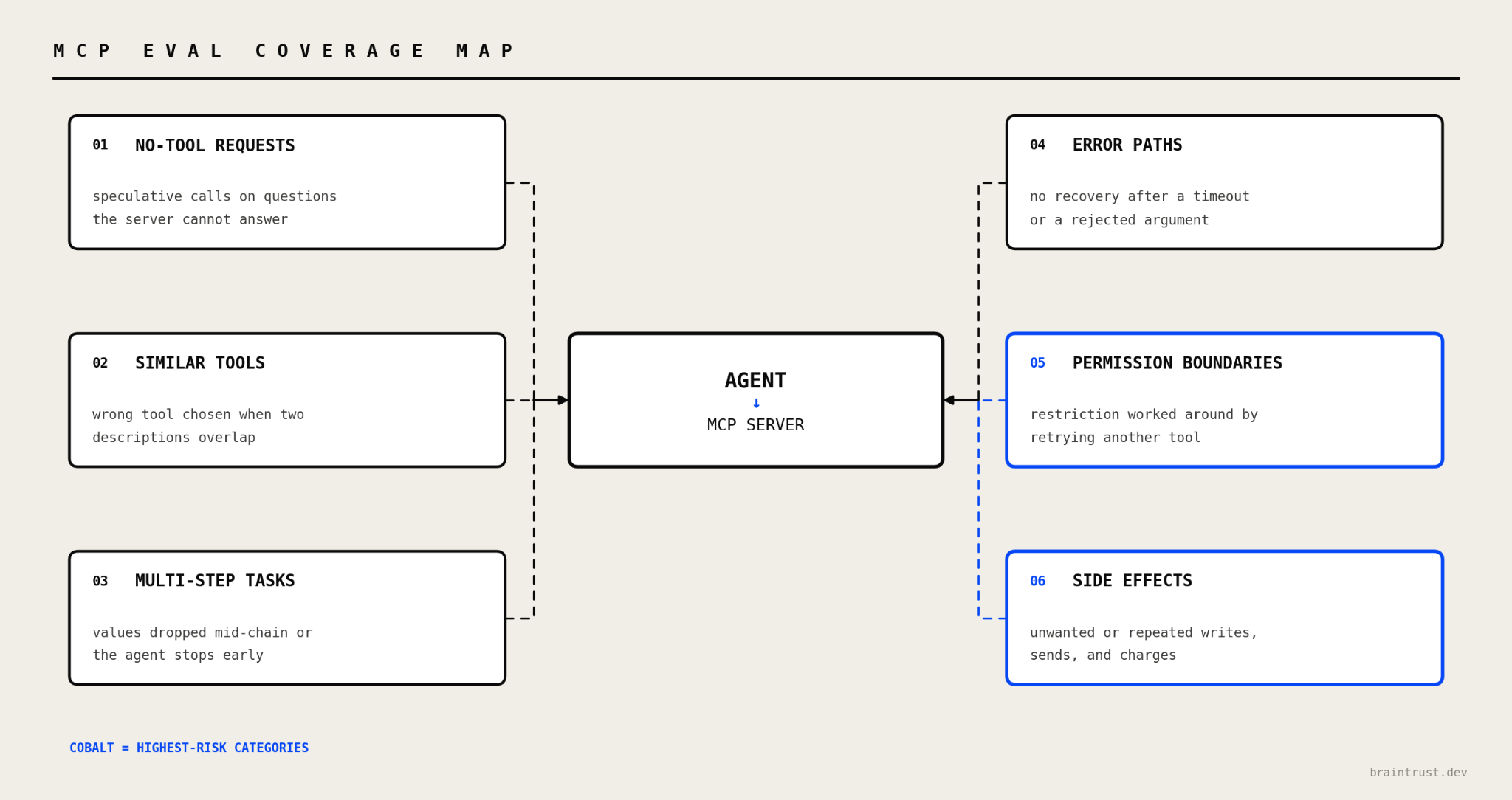
The coverage map groups MCP eval cases by the failure each category is intended to expose. Permission-boundary and side-effect cases need stricter release thresholds because failures can cause unauthorized or irreversible changes.
Requests that need no tool: Include requests outside the server's scope and questions answerable from existing context. The case passes when the agent answers directly and makes no speculative tool call.
Requests that match several similar tools: Create prompts that distinguish pairs such as search_orders and list_orders. The agent should identify the correct tool from user intent, available context, and each tool's documented scope.
Multi-step and cross-tool tasks: Test workflows that pass an ID or status from one call to the next and verify call order, value propagation, and completion across the entire request.
Error and failure paths: Use missing records, rejected arguments, and timeouts to evaluate recovery. Expected behavior may include a corrected retry, a clear explanation, or a safe stop based on the error and tool contract.
Permission boundaries: Ask the agent to perform an action unavailable under the current credentials. Passing behavior requires a clear refusal without searching for another tool or argument pattern that bypasses the restriction.
Actions with side effects: Cover writes, deletes, messages, and charges with checks for user intent, exact arguments, and execution count. The agent should avoid speculative actions and execute an approved action once.
How many cases and trials to run
40 to 60 carefully selected cases across all six categories will usually reveal more production risk than hundreds of happy-path variants. Expand the dataset whenever production traces, support tickets, or schema changes expose a new failure mode.
Run 3 to 5 trials per case to smooth ordinary model variation, and keep pre-merge suites fast enough for regular use. Permission-boundary and side-effect cases justify higher counts because inconsistent behavior can produce unauthorized or irreversible changes.
Scoring methods for MCP evals
Each stage of an MCP interaction has a different pass condition. A single scoring method may miss real failures or reject valid behavior, so choose scorers based on the evidence available at each stage.
Deterministic assertions on tool calls and arguments
Use code-based assertions when a test has one correct result. Check the selected tool name, required arguments, value types and formats, exact values when known, and the absence of prohibited calls. Deterministic assertions produce stable results and work well as CI gates.
Trajectory and final-state checks
Trajectory checks evaluate the complete call path. They verify that the agent orders dependent calls correctly, passes values between steps, avoids duplicate work, and finishes within an acceptable step budget. Define constraints around required calls and dependencies because several valid orderings may reach the same result.
Final-state checks query the database or downstream API after execution and compare the stored values with the expected outcome. They detect cases where the agent reports success even though no write occurred or the wrong record changed.
Model-based scorers for task completion and output quality
Use model-based scorers when the pass condition requires semantic judgment, such as determining whether a response addressed the request or explained a refusal clearly. Give each scorer a narrow rubric focused on one dimension. Validate every model-based scorer against human-labeled cases because a broad or miscalibrated judge can produce scores that do not identify the failed behavior.
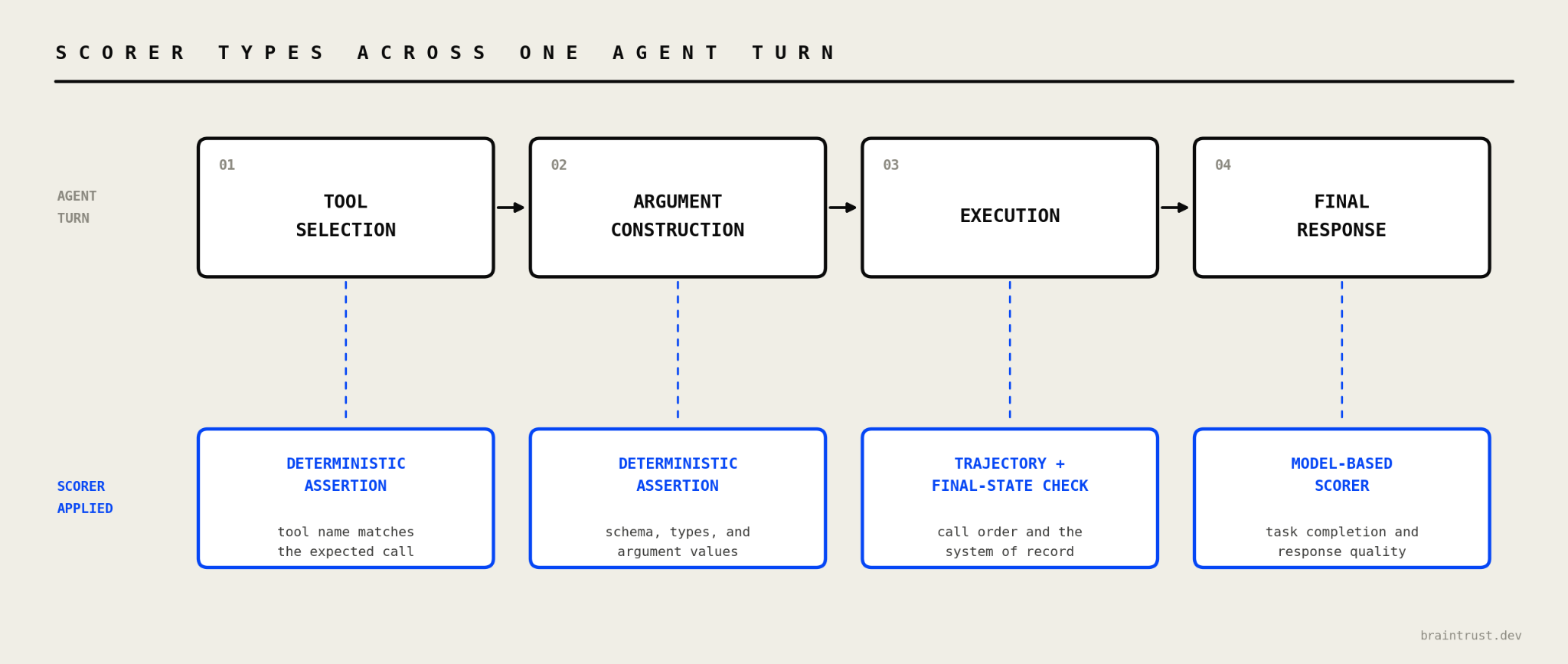
Scorer selection follows the stage of the agent turn. Deterministic assertions verify tool selection and arguments, trajectory and final-state checks evaluate execution, and model-based scorers assess the final response.
Setting failure-specific thresholds
Do not collapse every scorer into a single average. A 91% aggregate pass rate can hide unauthorized writes if every failure comes from the remaining 9%. Set a separate release threshold for each failure class according to its impact. Permission violations and destructive actions require zero tolerance. Redundant read calls can run against a bounded efficiency budget instead.
How to debug MCP eval failures with traces
A failed score identifies the case but not the component that caused it. The same incorrect outcome can originate in the tool description, schema, MCP server, model, agent instructions, or scorer. A complete trace reconstructs the decision and identifies the responsible component.
What an MCP trace should capture
An MCP trace should record the complete tool list shown to the model, model reasoning when available, the exact tool call and arguments, the raw server response, and the next agent action. Add timing and token counts to each span so one trace supports quality, latency, and cost analysis.
Without the full tool list, tool-selection failures are unreadable. A call that looks unreasonable on its own becomes predictable once the trace shows a second tool with an overlapping name or description.
Attributing a failure to its source
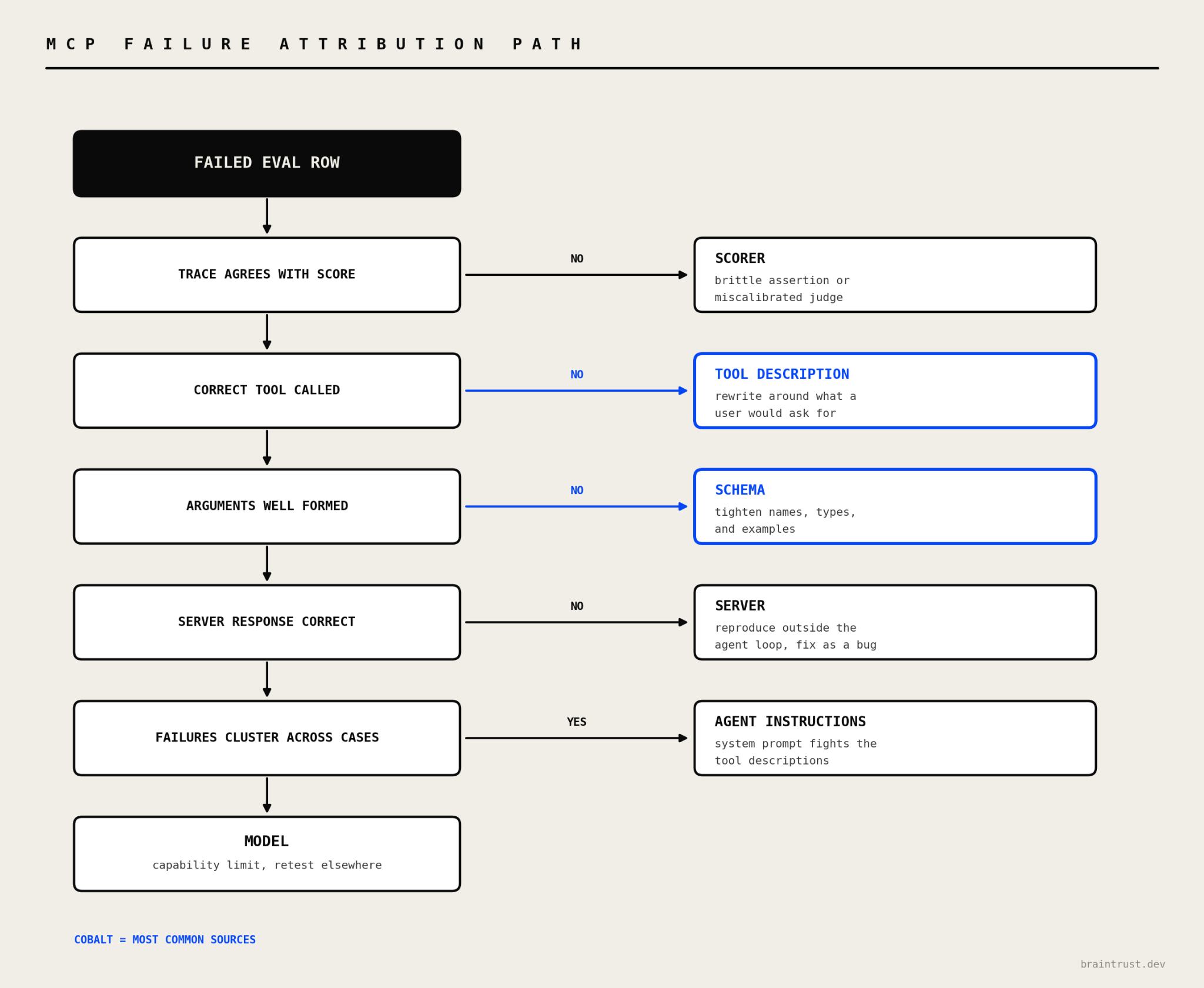
The attribution path starts with scorer validation, then checks tool selection, argument structure, server output, cross-case patterns, and model capability. Following this order avoids changing server code when the scorer or tool definition caused the failed result.
Scorer: If the trajectory and outcome meet the written criteria but the score fails, inspect the exact-match assertion or judge rubric. Update a brittle assertion or recalibrate the judge before changing the server or model.
Tool description: A reasonable but incorrect selection, or a skipped relevant tool, suggests the description doesn't match user intent. Rewrite the description around the requests the tool should handle, and clarify how it differs from similar tools.
Schema: Consistently malformed arguments often point to ambiguous field names, loose types, or missing examples. Add specific field names, stricter types, and representative examples before adjusting agent instructions.
Server: A correct call followed by a wrong, empty, or slow response indicates a server problem. Replay the call outside the agent loop and fix the business logic or performance issue if the result reproduces.
Agent instructions: Failures across unrelated tools often indicate that the system prompt contradicts tool descriptions or discourages tool use. Review the instructions for rules that require unsupported behavior or bias the agent away from calling tools.
Model: If the trace contains the required information but the model ignores it, rerun the same case with another model. Improvement on a stronger model points to a capability limit in the original model.
Why tool names and tool set composition change agent behavior
Tool names, descriptions, and the composition of the tool set are all input the model reads before choosing an action. Renaming a tool or revising its description shifts selection behavior without a single line of server code changing. Adding a similar tool redistributes calls between the two, and a long enough list drags selection accuracy down.
Version tool definitions alongside prompts and evaluate every change against a stable dataset. Compare the old and new definitions on the same cases before release so a one-line description edit cannot move the pass rate unnoticed.
MCP testing tools, frameworks, and benchmarks
MCP testing tools fall into four categories, and each category produces a different kind of evidence. Choosing by test objective prevents protocol results from being mistaken for evidence about agent behavior.
Protocol inspectors and MCP server testing tools
MCP Inspector is the official developer tool for testing and debugging MCP servers. Run the @modelcontextprotocol/inspector package with npx and connect through stdio, SSE, or Streamable HTTP. From there you can inspect tools, resources, and prompts, call tools with arguments you choose, and review the protocol interactions behind each call.
The operator chooses the tool and arguments during an Inspector session, so the result doesn't measure model-driven tool selection, argument construction, or task completion.
Open-source MCP eval harnesses
Open-source eval harnesses run a model against an MCP server and score the resulting behavior.
mcp-eval from LastMile AI works against servers written in any language and can generate its own test cases from the server's tools. Tests can be written in pytest, dataset, or decorator style, and every run emits OpenTelemetry traces. A CLI and a GitHub Action cover local and CI execution.
MCPJam combines protocol inspection, OAuth conformance checks, model-driven evals, multi-model comparison, and CI execution through its CLI and SDK. MCPJam runs as a hosted web app, desktop application, or local npx process.
MCP Test Harness stays deterministic, using pytest-style assertions for functional correctness, schema and protocol validation, snapshot regression, and performance and security baselines. Deterministic assertions make it a fit for CI gates that check repeatable server behavior.
Public MCP benchmarks
Public benchmarks evaluate general model competence across standardized MCP tasks.
MCP-Universe contains 231 tasks across 6 domains and 11 MCP servers.
MCP-Bench connects agents to 28 live MCP servers with 250 tools and tests tool discovery from prompts that omit explicit tool names.
MCPToolBench++ draws on more than 4,000 marketplace and community MCP servers across more than 45 categories, with datasets for single-step and multi-step tool use.
Benchmark results support model selection and research into common tool-use failures. Release decisions still require evaluations against the production server, schemas, tool definitions, and agent configuration.
How to choose an MCP evaluation framework
| Tool category | What it verifies | Where it runs | What it leaves uncovered |
|---|---|---|---|
| Protocol inspectors | Connection, capability discovery, schema inspection, and individual calls | Local UI or CLI | Model-driven tool selection and task completion |
| MCP eval harnesses | Tool selection, arguments, execution paths, and task completion | Local and CI | Centralized experiment history and production scoring |
| Agent evaluation platforms | Datasets, full traces, custom scorers, experiment comparison, CI gates, and production scoring | Connected to development and production systems | Detailed protocol conformance |
| Public benchmarks | General model competence across published MCP tasks | Research harnesses | Behavior specific to the production server and tool definitions |
How to run MCP evals in Braintrust
After protocol inspection confirms connectivity and capability discovery, Braintrust evaluates how a real model uses the MCP server. Each test case passes through the configured agent and server, then Braintrust records the execution path, applies scorers, and preserves the results for comparison and CI.
Step 1. Store MCP task datasets and trace agent activity
Braintrust datasets are versioned collections of test cases. For an MCP eval, store the user request in input, the expected behavior in expected, and fields such as coverage_category and risk_level in metadata. The metadata supports pass rates and release thresholds for individual failure classes without blending permission violations with lower-risk efficiency issues.
Populate the dataset with curated cases or promote relevant production traces after confirming the expected behavior. A production failure then becomes a repeatable regression case tied to the trace that produced it.
When the dataset runs, Braintrust creates the eval, task, and scorer structure for each case. Nested spans for provider calls, agent operations, and MCP tool invocations appear only when those operations are instrumented. Supported provider auto-instrumentation captures model calls automatically; tool invocations, retrieval steps, and other application logic need custom tracing. Without that setup, trajectory scorers have no tool-call spans to inspect. Advanced eval techniques cover how to add tracing inside evaluation task functions so each span records inputs, outputs, timing, and metadata.
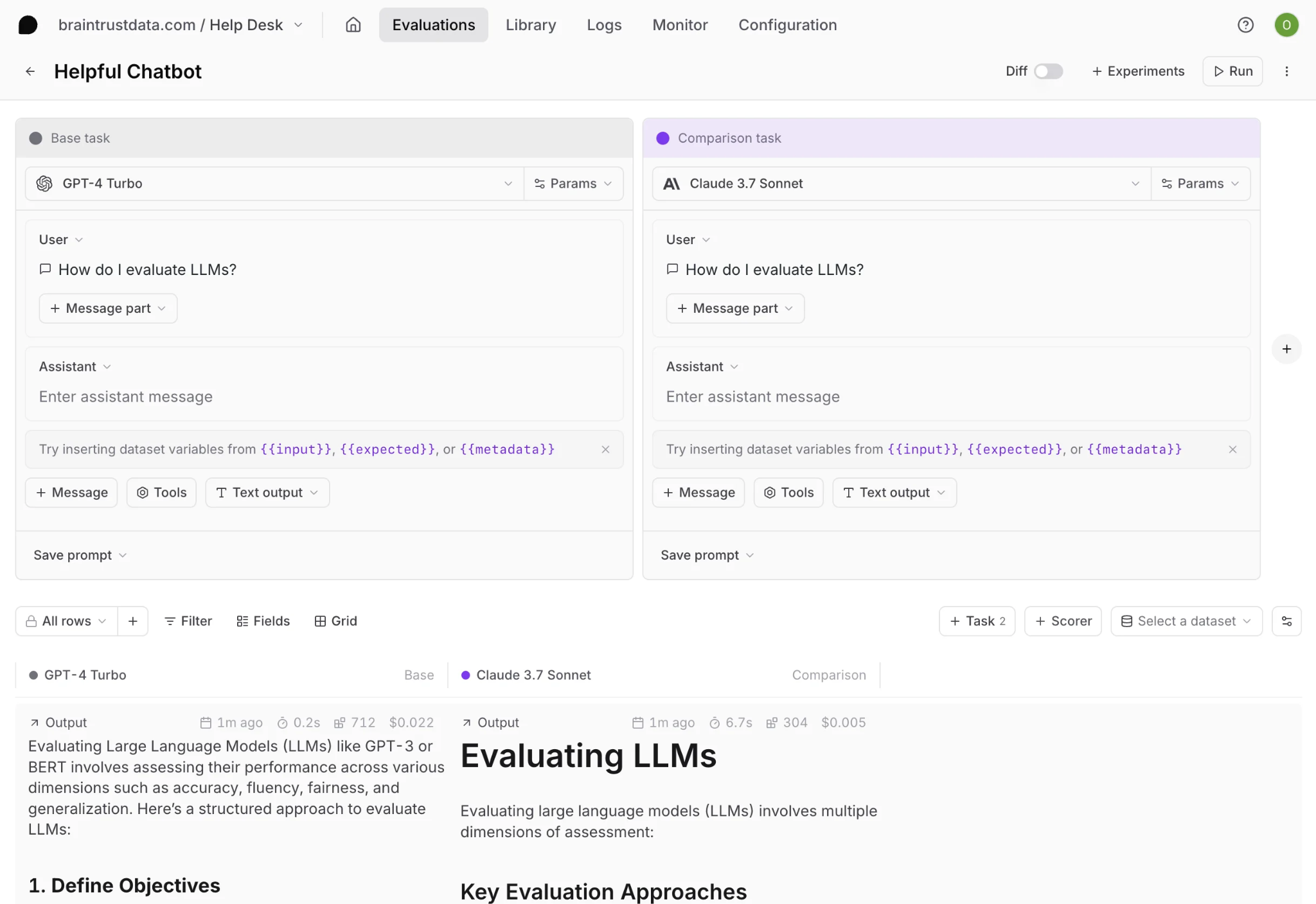
Use Playgrounds to configure MCP servers alongside the model, prompt, parameters, and tools. Run configurations side by side to examine how a model change or revised tool description affects selection and task completion. If the agent depends on custom code or internal services, remote evals run it inside your own environment and return the results to Braintrust. Remote and custom agents still need the same instrumentation for tool trajectories to appear in the returned traces.
Step 2. Score tool selection, arguments, and task completion
Match each scorer to the MCP behavior it needs to verify.
Custom code scorers: Write deterministic checks in Python or TypeScript for selected tool names, required arguments, value formats, call counts, and final-state conditions. Custom code scorers suit rules with an exact pass condition.
Autoevals: Use Autoevals for common output checks such as factuality, semantic similarity, and format validation.
LLM-as-a-judge scorers: Define narrow criteria for task completion, response quality, and refusal behavior. Validate every LLM-as-a-judge scorer against human-labeled cases before using its result as a release requirement.
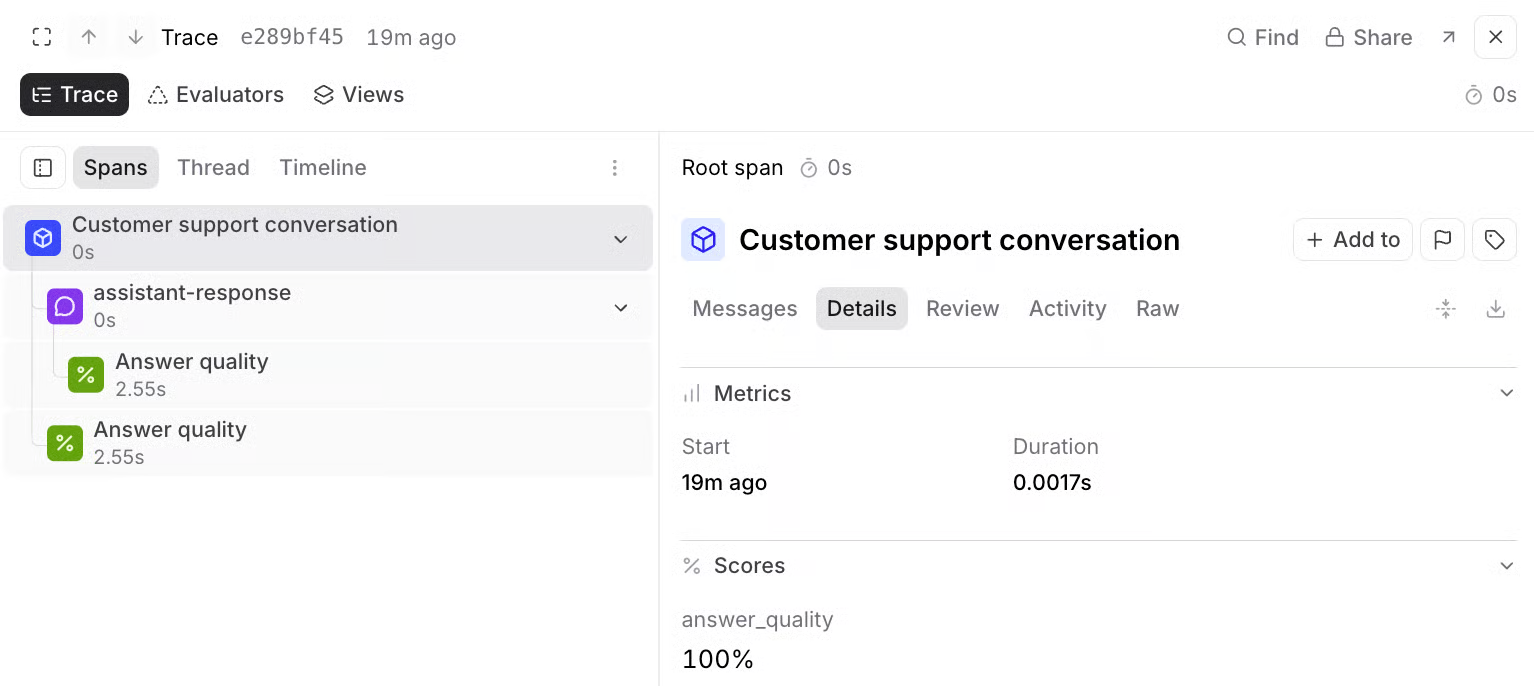
The screenshot above is a Logs view, where the Evaluators tab lets you test scorers on a production trace. That tab appears in Logs and does not appear in Experiments. Online scoring applies the same scorers asynchronously to live traffic, and each result lands as a score span on the instrumented trace. Experiment runs store scores on the evaluation row the same way when the task is instrumented, so a failed score stays connected to the tool list, arguments, server response, and agent actions that produced it.
Step 3. Compare models, prompts, tool definitions, and server versions
Save a Playground configuration as an experiment or run the eval from code to preserve an immutable result. Use experiment comparison to test one change at a time, such as the model, agent instructions, MCP client configuration, tool description, schema, or server version.
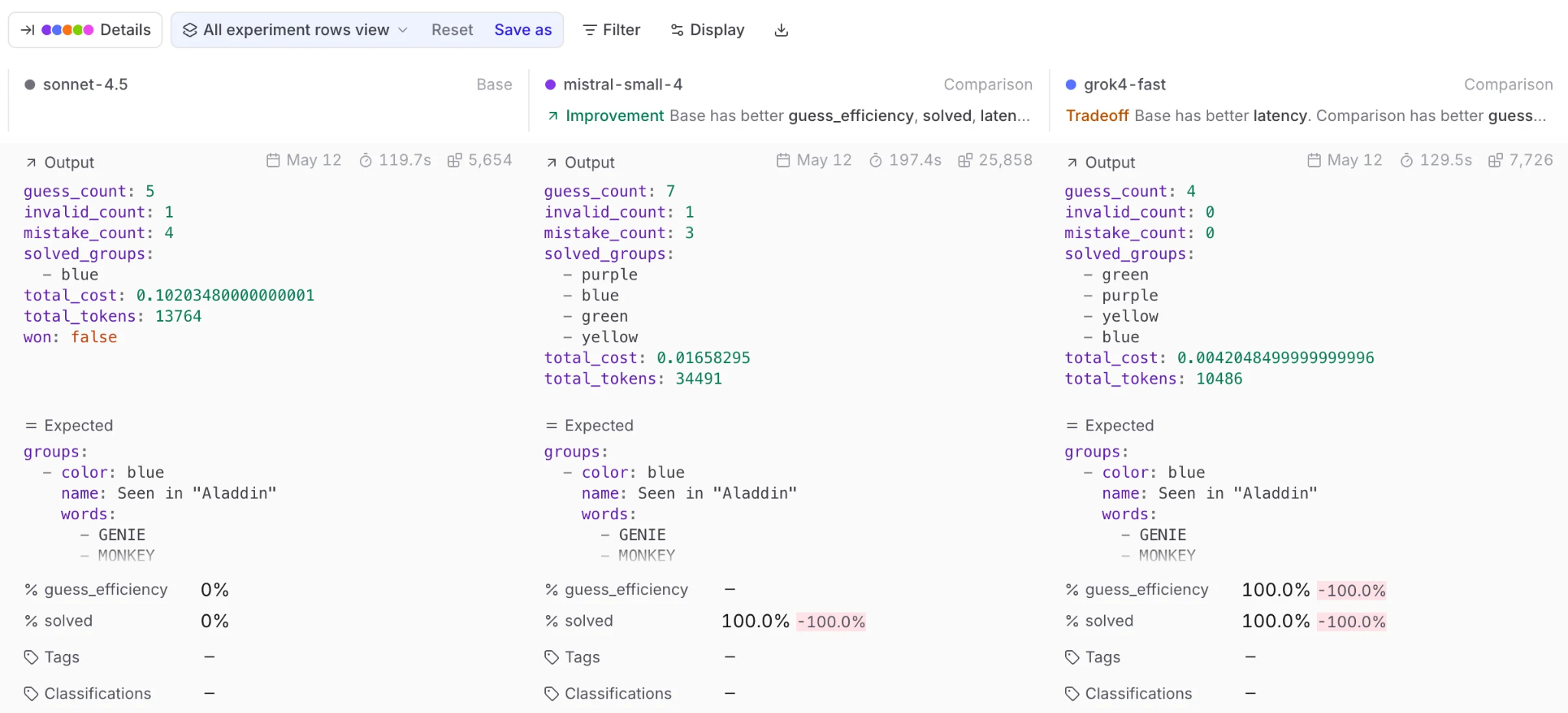
Diff and summary views show score changes against a baseline at both aggregate and test-case levels. Filters expose which rows improved or regressed, so a higher overall score cannot hide new failures in permission-boundary or side-effect cases.
Trials repeat the same input and group the results for comparison. Braintrust shows aggregate statistics for the input and retains each trial for inspection, which separates normal model variation from a reproducible regression.
Step 4. Run MCP regression evals in CI
Run Braintrust experiments in CI with the braintrustdata/eval-action@v2 GitHub Action or the bt eval CLI. The GitHub Action executes the suite on each pull request and posts a results summary as a comment.
Define a custom Reporter so individual scorer thresholds determine the CI exit result. Permission violations and unsafe side effects can block a merge, with latency, token use, and redundant calls tracked under advisory efficiency budgets. Because tool descriptions and schemas live beside the server code, every pull request can evaluate those changes against the same dataset and baseline.
Start testing your MCP server against real agent behavior with Braintrust →
FAQs about MCP testing and evals (2026)
What is the difference between MCP testing and MCP evals?
MCP testing is the broader process of checking server logic, protocol compliance, authentication, security, and performance. MCP evals focus on model-controlled behavior, including tool discovery, selection, argument construction, error recovery, and completion of the user's request.
How many test cases does an MCP eval suite need?
40 to 60 cases is a reasonable starting range, but tool count, description overlap, and action risk should determine the final size. Each critical behavior needs more than one phrasing, and every production failure should become a regression case in a versioned Braintrust dataset.
Can you run MCP evals in CI?
Braintrust can run MCP evals on pull requests through GitHub Actions or the bt eval CLI. Configure the suite to compare the proposed change with an approved baseline, then use a custom reporter to fail the build when permission, side-effect, or task-completion scores cross the release threshold. Faster smoke runs can cover pull requests, with the complete suite reserved for merges.
What is the best MCP server testing tool?
MCP Inspector is the right tool for protocol-level checks such as connection, schema inspection, capability discovery, and manual calls. Braintrust evaluation is the stronger choice when the goal is to measure how real models select tools, form arguments, complete tasks, and behave after release.
How do you benchmark an MCP server?
Freeze the server version, tool definitions, agent instructions, model, dataset, and scorer versions for the baseline run. Repeat each case to measure variance, then track tool-selection accuracy, argument validity, task completion, unsafe-action rate, latency, and cost through Braintrust experiments. Rerun the same configuration after each change so score differences reflect the change under review.